About the lab
What is Build an Atom?
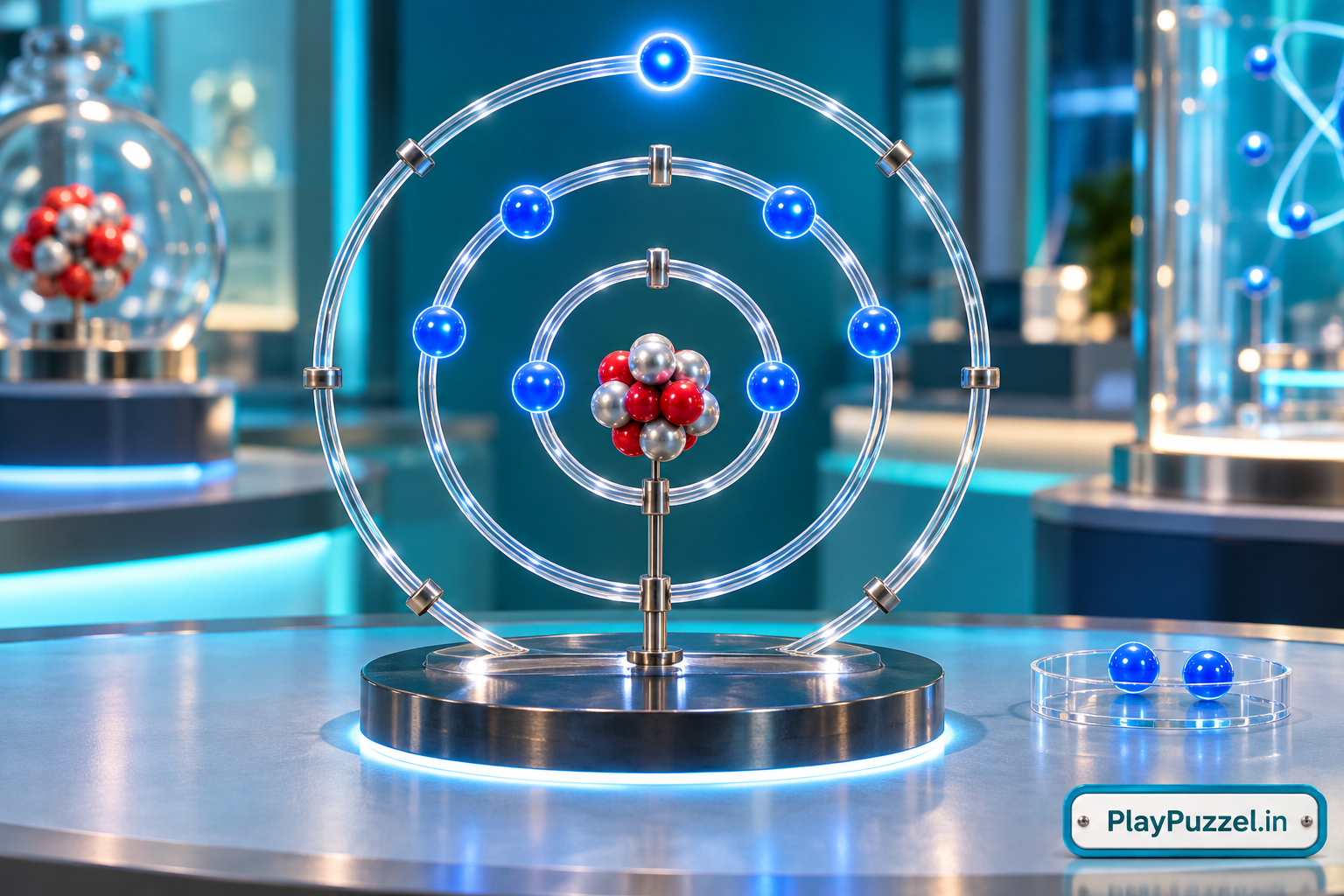
Everything around us is made of atoms, but atoms are far too small to see. Build an Atom turns them into something a child can hold on screen. Every particle added changes the atom straight away, so cause and effect are easy to follow: one more proton turns hydrogen into helium, one more electron turns a neutral atom into an ion.
Short missions give each visit a goal, such as making helium, building a carbon atom or finding an atom with a full outer shell. Free explore mode has no score at all, so a curious child can keep adding particles just to see what happens.
How the atom model works
The number of protons decides the element, so the lab names it the moment the nucleus changes. Neutrons add mass without changing the element, which is how children meet isotopes such as carbon-14. Electrons balance the charge of the protons; too many or too few makes an ion, and the lab shows the charge as a plus or minus sign.
Electrons fill shells from the inside out. The lab draws each shell and shows when the outer one is full, which explains why some atoms are calm and others are eager to react. The model is simplified for learning, and the facts it reports, such as element names, mass numbers and electron arrangements, are real.
Three levels, from first atom to ions and isotopes
Beginner, for ages 6 to 8, uses words and pictures and the first ten elements. Explorer, for ages 9 to 11, adds atomic and mass numbers, ions, isotopes and elements up to calcium. Advanced, for ages 12 to 14, reaches iron and beyond, with isotope notation and electron configurations. Any child can choose any level their plan allows; age never locks a level.
Experiments you can try
Beginner, ages 6–8 Free, no sign-in
- Make hydrogen
- Make helium
- Make carbon
- A happy atom
Explorer, ages 9–11 Free with sign-in
- Make a sodium ion
- Make an oxide ion
- Carbon-14
- Make calcium
Advanced, ages 12–14 PlayPuzzle Premium
- Make iron
- Make Fe²⁺
How to play
- Choose a level and a mission, or open free explore.
- Tap or drag protons and neutrons into the nucleus.
- Add electrons and watch them take their place in the shells.
- Read the atom card: the element, its mass number and its charge.
- Complete the mission to earn up to three stars, then try the next one.
What kids learn
- That atoms are made of protons, neutrons and electrons
- That the number of protons decides which element an atom is
- That neutrons change an atom's mass but not its element
- How extra or missing electrons turn an atom into an ion
- How electrons fill shells, and why a full outer shell makes an atom stable
- How to read atomic number, mass number and simple isotope notation
Skills practised
Levels and ages
- Beginner, ages 6–8: Free, no sign-in, 4 missions.
- Explorer, ages 9–11: Free with sign-in, 8 missions.
- Advanced, ages 12–14: PlayPuzzle Premium, 10 missions.
Levels are opened by plan and never locked by age, so any child can pick the level that suits them.
Is it safe?
Everything in the Science Lab happens on screen. Children combine curated, virtual materials only, and the lab never gives instructions for trying an experiment for real.
Frequently asked questions
What age is Build an Atom for?
It is written for ages 6 to 14 at three levels. Beginner uses words and pictures, Explorer adds numbers, ions and isotopes, and Advanced adds isotope notation and electron configurations.
Is Build an Atom free?
Yes. The Beginner level plays free with no sign-in. A free PlayPuzzle account unlocks the Explorer level, more elements and saved progress, and PlayPuzzle Premium adds the Advanced level.
Is the atom model scientifically accurate?
The particles, element names, mass numbers, charges and electron arrangements are real. The picture of electrons circling in shells is a simplified model, which is how atoms are first taught in school science.
Do children need to know any chemistry first?
No. The first missions start with a single proton, and every result is explained in simple words. Older children can move straight to the Explorer or Advanced level.
Does it work on phones and tablets?
Yes. Every drag also works as a tap, the controls are large, and the lab fits phones, tablets and computers.